The Logitech MX Anywhere line has always been about one thing: getting serious productivity features into a small mouse you can toss in a bag and use anywhere. The older Anywhere 2 already did that really well, so this is not one of those situations where the previous model suddenly became useless overnight.
That said, the MX Anywhere 3 is better.
After comparing both side by side, there are five main differences that actually matter in daily use, plus one bonus difference that some people will care about more than others. If you are trying to decide whether to keep the older model, upgrade, or buy one of them for the first time, these are the things worth paying attention to.
Table of Contents
- 1. The design is softer, cleaner, and more comfortable
- 2. The side buttons are easier to reach on the MX Anywhere 3
- 3. USB-C charging is a real quality-of-life upgrade
- 4. The scroll wheel is the biggest upgrade
- 5. Scroll wheel tilt is gone, but the middle click returns
- Bonus difference: the old mouse has quieter clicks
- Other useful features the MX Anywhere 3 brings to the table
- So which one should you buy?
- FAQ
1. The design is softer, cleaner, and more comfortable
Right away, the MX Anywhere 3 looks more refined. The Anywhere 2 has a sharper, more angular design. Its edges feel more aggressive, and the whole mouse has a slightly older industrial look. The Anywhere 3 rounds things out almost everywhere. It feels softer visually and physically.
That design shift is not just cosmetic. It changes the grip.
On the side of the Anywhere 2, Logitech used a polygon-style triangular grip texture. It looks cool, no question. But on the Anywhere 3, the grip has a subtle wavy line pattern, and in actual use I found that pattern easier to hold. Your thumb rests more naturally against those lines, and the mouse feels more secure without needing to squeeze it.
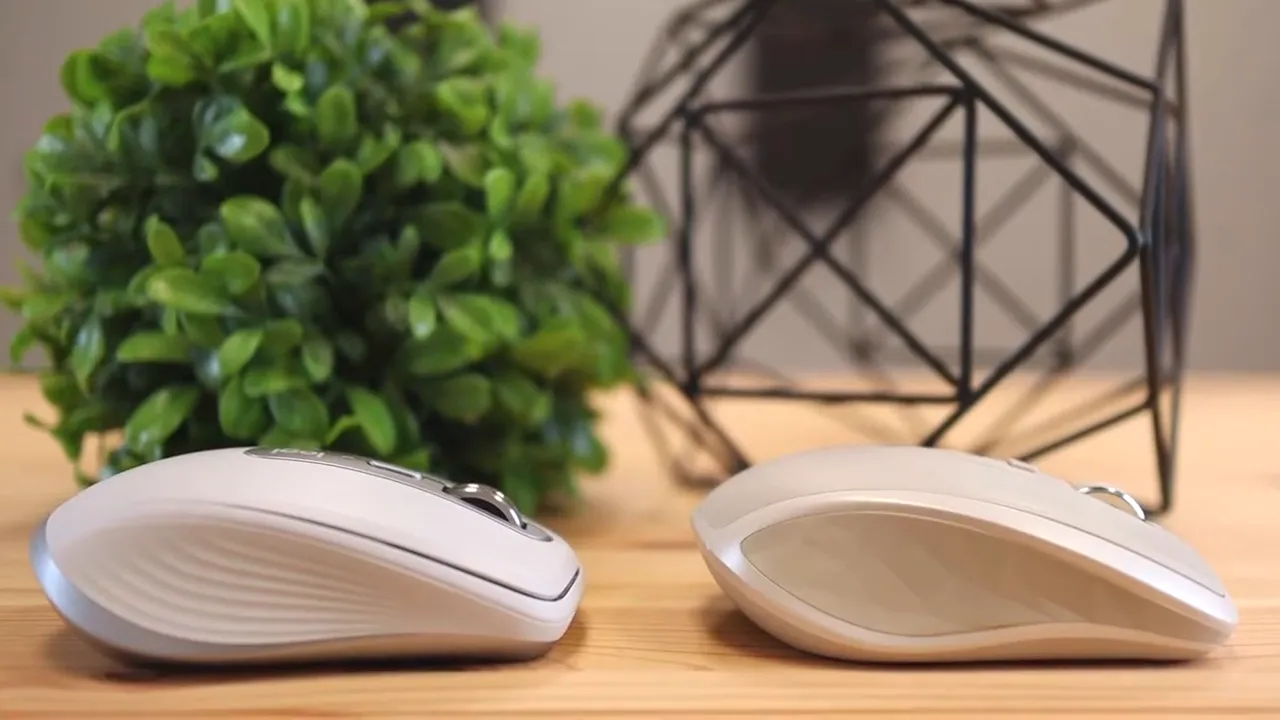
There is also a subtle shape change near the thumb area. On the MX Anywhere 3, the body flares out just a bit differently, which lets your thumb lay more comfortably along the side. That little contour makes the newer mouse feel more natural in the hand.
If comfort matters and you use a compact mouse for long stretches, this is one of the biggest reasons to lean toward the newer model. It is still a low-profile travel mouse, but the ergonomics are improved.
If you want a deeper look at how the newer model feels day to day, I already broke that down in this MX Anywhere 3S review. Different model generation, same core idea of what makes this shape work for mobile productivity.
2. The side buttons are easier to reach on the MX Anywhere 3
At first glance, you might think the Anywhere 2 has the advantage because its side buttons are larger. Bigger buttons sound better on paper. In practice, I found the opposite.
The problem with the Anywhere 2 is not button size. It is button placement.
On the older mouse, the side buttons sit a bit higher and land on a part of the shell where the body bulges outward. That makes them slightly more awkward to hit quickly. On the MX Anywhere 3, the buttons are flatter and positioned closer to where your thumb naturally rests.
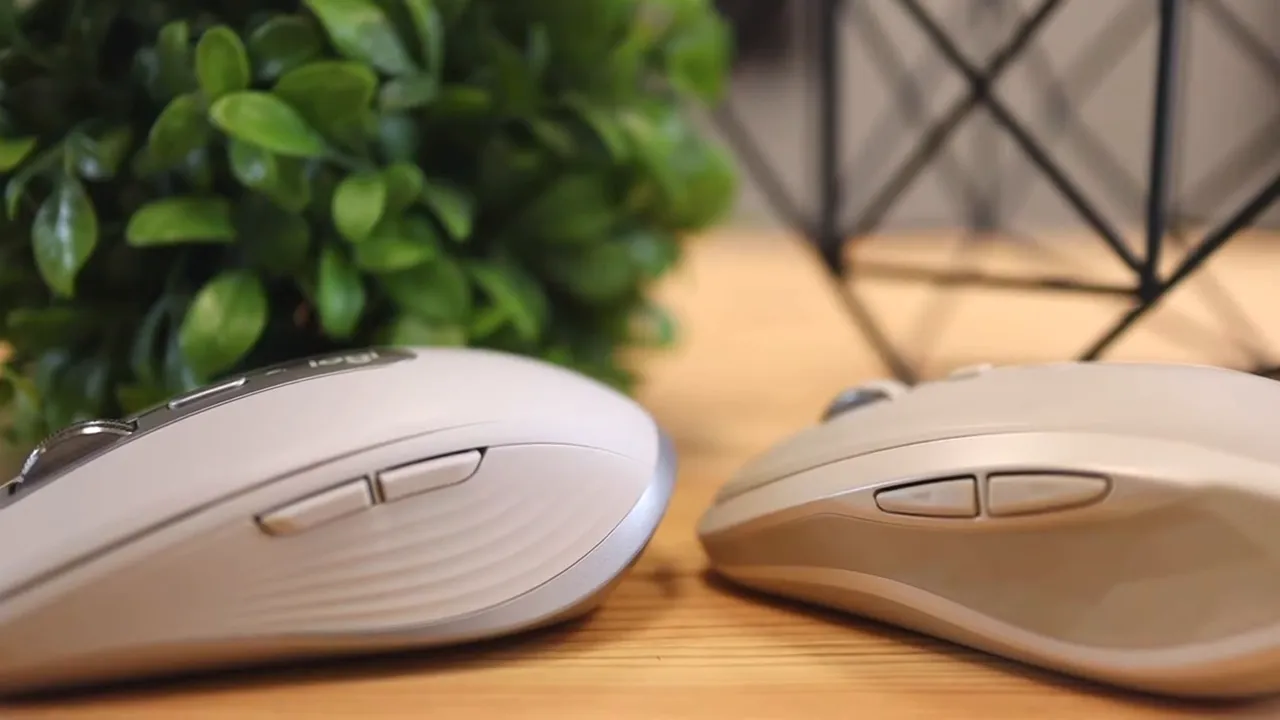
That means faster access and less repositioning. If you use back and forward buttons in a browser, app shortcuts, or custom commands in Logitech software, the newer layout is simply easier to live with.
This matters even more because the MX series is built around customization. Logitech's software lets you remap buttons for app-specific actions in tools like Chrome, Word, Excel, Photoshop, Premiere Pro, and more. If you are interested in that side of the ecosystem, take a look at this guide to Logi Options+ customization. The software concepts carry across the MX family.
3. USB-C charging is a real quality-of-life upgrade
This one is simple, but it matters.
The Anywhere 2 charges over micro-USB. The Anywhere 3 switches to USB-C.
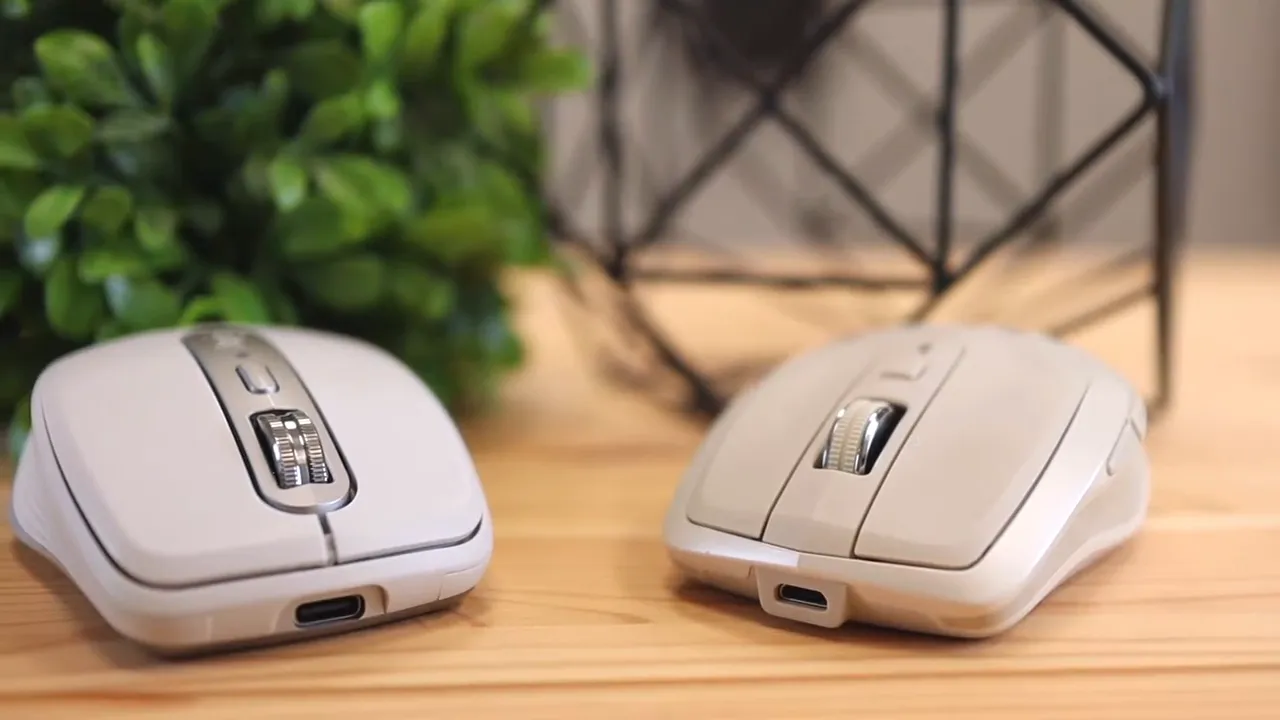
That change brings two obvious benefits:
- Better convenience if most of your desk setup already uses USB-C
- Faster charging on the newer model
For me, this is the kind of upgrade that makes everyday use less annoying. I do not keep micro-USB cables around my setup anymore, so needing one for the older mouse feels outdated even if the mouse itself still works well.
Logitech also highlights quick charging on the MX Anywhere 3, along with battery life rated up to 70 days on a full charge. That kind of battery performance is exactly what you want from a travel-friendly mouse.
If you are buying fresh today, USB-C is one of those features that pushes the newer model ahead without much debate.
4. The scroll wheel is the biggest upgrade
If there is one feature that really separates these two mice, it is the scroll wheel.
Both models give you two scroll behaviors:
- Regular ratcheted scrolling
- Fast, free-spinning scrolling
The difference is how they get there.
On the Anywhere 2, the scrolling system relies on a more traditional mechanical feel using friction and gearing. It works, but it is noticeably louder and feels more old school.
On the MX Anywhere 3, Logitech uses the MagSpeed scroll wheel. Instead of feeling gear-driven in the same way, it uses magnets to control the wheel. The result is smoother, quieter, and honestly just more fun to use. It has that premium effect where the hardware feels clever the second you touch it.
The MX Anywhere 3 also lets you toggle the free-scroll behavior using the middle mouse button, and you can further fine-tune the experience in Logitech software. One of the best features is automatic shifting. Flick the wheel hard enough and it moves into hyper-fast scrolling. Scroll more slowly and it stays in that precise ratcheted mode.
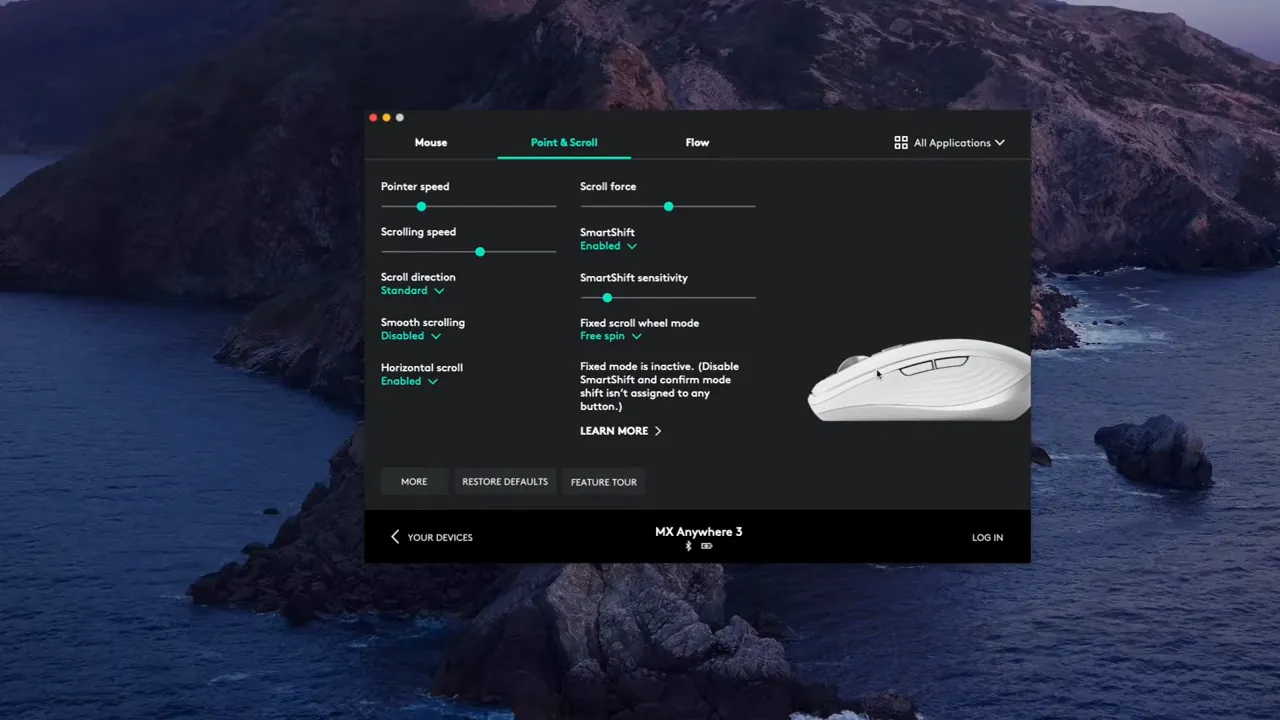
That combination of speed and precision is the main reason I prefer the MX Anywhere 3. Logitech advertises the ability to scroll huge documents quickly while still stopping accurately on a single line or pixel, and that lines up with the overall idea of the mouse. It is built for mobile work, but it still feels premium.
The older wheel is perfectly usable. The newer one is just way more satisfying.
5. Scroll wheel tilt is gone, but the middle click returns
This is the tradeoff that will split opinions.
On the Anywhere 2, the scroll wheel tilts left and right. Those tilt inputs can be used for horizontal scrolling or remapped to shortcuts inside Logitech software. That effectively gives you two extra button actions.
On the MX Anywhere 3, Logitech removed left and right tilt. So yes, technically you lose those dedicated tilt inputs.
But the newer mouse adds something the older one does not have in the same way: a proper middle mouse button press.
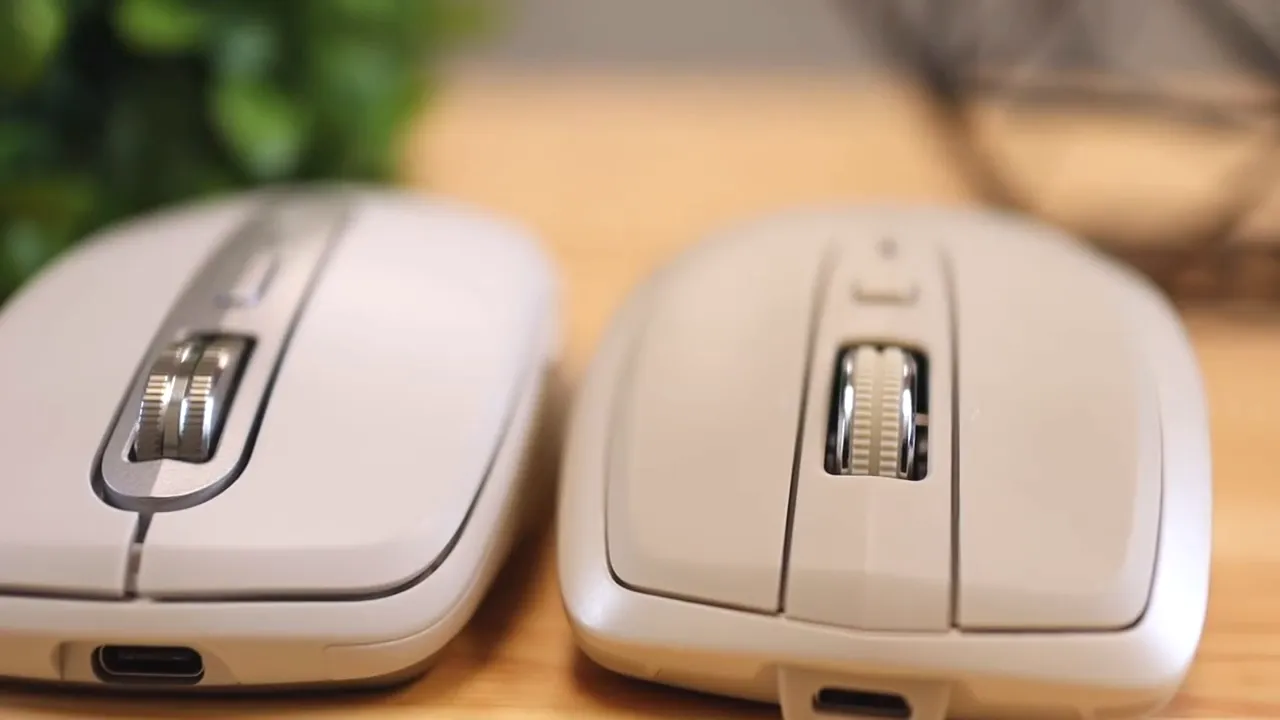
If you rely heavily on tilt gestures, the Anywhere 2 may still be the better fit. For some workflows, especially wide spreadsheets or timelines, dedicated left and right tilt can be useful.
Logitech did not completely ignore horizontal scrolling on the Anywhere 3 though. The workaround is clever: hold the forward side button while scrolling, and the wheel switches to horizontal scrolling. Regular scrolling still works normally for vertical movement.
So the feature is not gone. It is just handled differently.
I actually like the way Logitech thought this through. The company managed to simplify the hardware while preserving functionality. It is a good example of reducing complexity without removing real utility.
Bonus difference: the old mouse has quieter clicks
This one may or may not matter depending on your environment.
After testing both, the Anywhere 2 has quieter primary clicks than the MX Anywhere 3. The difference is easier to notice in person than on paper, but it is there.
The newer mouse is not obnoxiously loud. It just has a more noticeable click sound. If you work in a quiet room and are sensitive to mouse noise, that could be a point in favor of the older model.
Funny enough, the newer mouse wins on scroll wheel refinement but loses slightly on click subtlety. So there is a little tradeoff there.
Other useful features the MX Anywhere 3 brings to the table
Beyond the direct comparison points, the MX Anywhere 3 includes a few features that help explain why it is positioned as a premium portable mouse.
- Tracks on almost any surface, including glass
- Connects to up to three devices
- Works across Windows, macOS, iPadOS, ChromeOS, and Linux
- Supports Logitech Flow for moving content between computers
- Offers app-specific button profiles for popular productivity and creative tools
If tracking performance on unusual surfaces matters to you, Logitech's claim about glass tracking is one of the headline features of the newer model. For people who work from different desks, cafes, couches, or shared spaces, that kind of reliability adds real value.
You can also compare the newer generation against later refinements in this MX Anywhere 3 vs 3S comparison if you are trying to figure out where the whole lineup now stands.
For broader context on mouse design and productivity-focused models, Logitech's own official site and the Logi Options+ software pages are useful references.
So which one should you buy?
Here is the short version.
Choose the MX Anywhere 3 if you want:
- Better ergonomics
- Easier-to-reach side buttons
- USB-C charging
- A much better scroll wheel
- A more modern design
Choose the Anywhere 2 if you care more about:
- Quieter clicks
- Dedicated left and right scroll wheel tilt
- Possibly saving money if you find it at a good price
Personally, if I had to pick one, I would go with the MX Anywhere 3.
The biggest reason is the MagSpeed scroll wheel. It feels cleaner, smoother, and just more premium overall. On top of that, I prefer the newer design language, the improved grip, and the more accessible side buttons. Those changes make the mouse feel more ergonomic and easier to use in real life, not just on a spec sheet.
The Anywhere 2 is still a good mouse. I would not complain about using it as a portable option. But once you put it next to the Anywhere 3, the newer model is the one I would reach for.
If you want to check current pricing, the MX Anywhere 3 is available here and the older Anywhere 2 can still be found here. If the newer model is the one you are leaning toward, you can also check the MX Anywhere 3 listing.
FAQ
Is the Logitech Anywhere 2 outdated?
Not really. It is older and lacks some modern conveniences like USB-C and the newer MagSpeed wheel, but it is still a capable portable mouse with strong features.
What is the biggest difference between the MX Anywhere 3 and Anywhere 2?
The scroll wheel is the standout upgrade. The MX Anywhere 3 uses Logitech's MagSpeed system, which feels smoother, quieter, and more premium than the older wheel design.
Does the MX Anywhere 3 lose horizontal scrolling?
No. It loses the dedicated left and right tilt wheel inputs, but horizontal scrolling still works by holding the forward button while scrolling.
Which mouse has better side buttons?
The MX Anywhere 3 has better side button placement. Even though the Anywhere 2 has larger buttons, the newer mouse places them where the thumb reaches more naturally.
Which one is better for a modern desk setup?
The MX Anywhere 3 is the better fit for most modern setups because it uses USB-C, has newer software-friendly features, and feels more refined overall.


