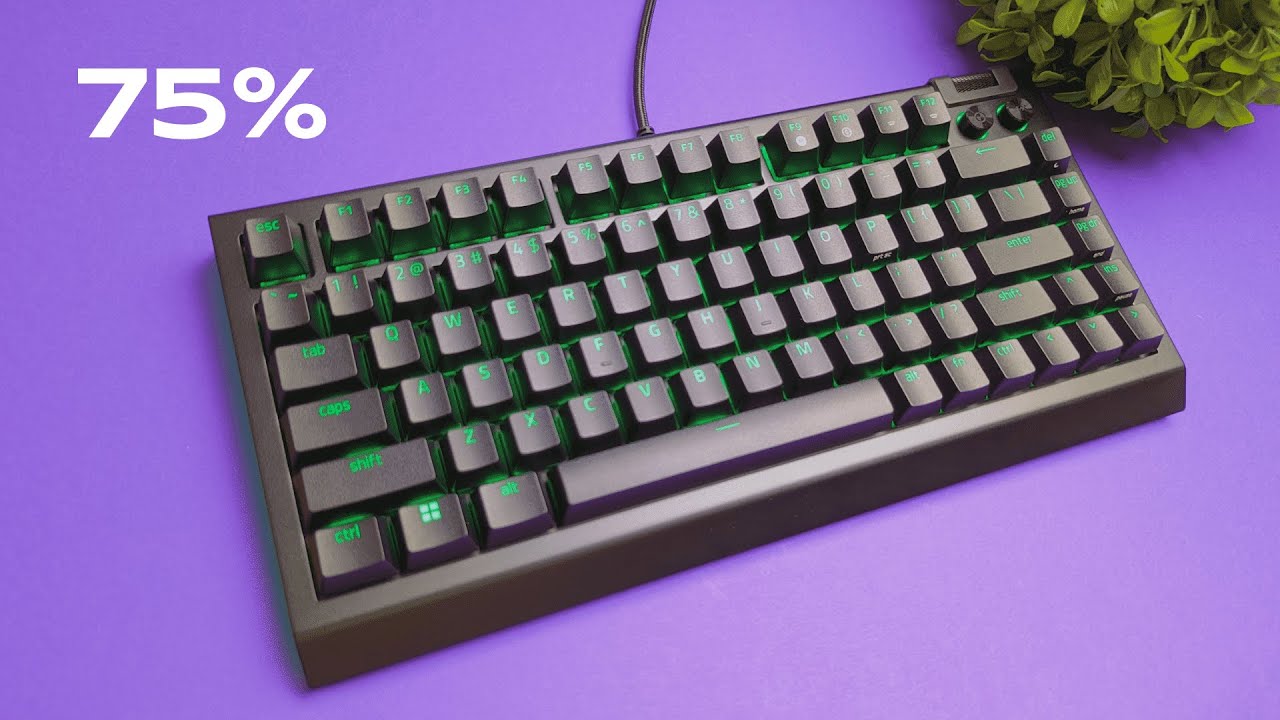
I’m Kova Tech, and I just spent some hands-on time with the Razer BlackWidow V4 75% mechanical keyboard. This is my first impressions write-up based on unboxing, sound testing, and an initial modability check. I’ll follow up with an in-depth review soon, but here’s everything I noticed so far — from the switches and dampening to the wrist rest, RGB underglow, and the fact that this is the first truly hot-swappable BlackWidow in Razer’s lineup.
Quick overview: what’s in the box
Right out of the box you get everything you’d expect for a premium gaming keyboard and a little extra that shows Razer is courting the modding crowd:
- Razer BlackWidow V4 75% keyboard
- Magnetic leatherette wrist rest with embedded Razer logo
- USB-C to USB-A braided cable
- Keycap puller and a combination key switch puller
- Instruction manual and a few stickers
The wrist rest feels particularly premium — I joked that the leatherette feels like something from a Mercedes G-Wagon — and it snaps to the keyboard with magnets so it stays attached when you move the board around.
First impressions: sound, feel, and feel-good factor
My immediate reaction was about the sound. The BlackWidow V4 75% I tested uses Razer’s orange switches, which are tactile but quieter than the loud “green” switches you’ll find in some other Razer models. Compared side-by-side with the full-size BlackWidow V4 Pro (with green switches), the 75% model sounded much better to my ears — less clacky, more rounded.
That improvement isn’t just down to switch type. Razer has added a soft dampening layer inside the 75% model and the switches it ships with are lubricated from the factory. That combination makes a big difference — it reduces ping, softens bottom-out, and gives the keyboard a more premium acoustic signature. The V4 Pro I compared it to lacks these dampening layers and doesn’t ship with lubricated switches, which explains the difference.
Hot-swappable switches: finally, real modability from Razer
This is the headline feature for a lot of people: the BlackWidow V4 75% is Razer’s first keyboard that’s truly hot-swappable. That means you can remove individual key switches and replace them with other 3-pin or 5-pin switches without soldering. If you’ve been modding hobby keyboards, you know how valuable this is.
Removing a keycap is standard, but pulling the switch itself off the plate is new for Razer. The keyboard includes a switch puller — insert it, pull the cap, then flip the switch puller over to engage the two retention clips and pull the switch out. Each switch has two pins that register to the logic board.
The stock orange switch is tactile — think of Browns in terms of tactility and Blues in terms of feel, but without the loud click. If you prefer linear, clicky, or heavier tactile switches you can swap in almost anything you like (Razer or third-party). This opens up custom sound and feel profiles: try different switch brands, lubing jobs, or even foam and plate mods to tune acoustics.
Build quality, materials, and ergonomics
The BlackWidow V4 75% mixes materials well. There’s aluminum trim on the front and top which gives it weight and a premium look, with a plastic back housing the internals. The adjustable rear legs have rubberized grips and two height positions. Depending on how I positioned the legs and wrist rest, my personal comfort varied — I preferred the shorter legs with the board closer to the wrist rest.
The wrist rest is magnetic and attaches cleanly. Because it’s magnetic it stays attached when you drag or shift the keyboard, which eliminates the annoying “wrist rest pops off” problem some keyboards have. That said, ergonomics are subjective — I found the first (shorter) leg height plus the wrist-rest close to the board most comfortable for typing. If you want the keyboard more tilted, the higher leg position gives that option.
RGB lighting and underglow
Razer knows RGB, and the BlackWidow V4 75% doesn’t disappoint. It has per-key Chroma lighting plus two-side underglow that runs along the edges. Even without a white backplate, the lights are vibrant and “poppy” — Razer tends to push brightness and saturation, and that shows here. You can customize colors and patterns using Razer Synapse.
If you’re someone who likes bright, vivid lighting, you’ll appreciate how much energy Razer puts into the RGB. If you prefer a subtler look, Synapse gives you control to tone things down or match other Razer peripherals.
Media controls and day-to-day usability
The keyboard includes a non-clicking volume roller and two dedicated media buttons. The roller feels smooth and has a satisfying sound as you turn it; it doesn’t click but offers precise control. The two media buttons can be remapped in Synapse to other functions if you want to customize your workflow.
Connectivity is straightforward: USB-C to the keyboard and USB-A to your PC. This is a wired keyboard only, so no Bluetooth or wireless mode. For gaming and low-latency tasks that’s usually preferred anyway.
How this compares to other Razer keyboards
Compared to other BlackWidow models — especially the V4 Pro — this 75% version occupies a different space. The Pro is more full-sized, louder (with green switches), and not as mod-friendly. The new 75% takes a modern approach: compact layout, hot-swappability, dampening and factory lube, aluminum accents, and a wrist rest that’s built to stay attached.
It feels like Razer has been listening to the keyboard modding community and applied a lot of those expectations here. If you’ve wanted a Razer keyboard that you can truly customize, this is the first model where that promise is delivered.
Who should buy the BlackWidow V4 75%?
This keyboard is a strong choice if you want:
- A compact 75% layout that keeps the function row and arrows but saves desk space
- Stock tactile switches that are quieter and feel premium
- A hot-swappable platform so you can experiment with switches and mods
- Bright, saturated Razer Chroma RGB and underglow
- A premium-feeling wrist rest that stays attached via magnets
If you need wireless connectivity, ultra-quiet linear switches out of the box, or prefer an already highly-silent keyboard for streaming, this might not be your best pick without mods. But if you enjoy tuning sound and feel — lubing switches, adding foam, or swapping in third-party switches — the BlackWidow V4 75% is a compelling canvas.
Practical tips, recommended mods, and care
Some quick tips based on my hands-on time and what modders typically do:
- Try different switches: If the stock orange switches aren’t your jam, test linear (e.g., Gateron Ink Black), heavier tactiles, or even clicky housings if you like that feedback.
- Lube and foam: Even though these switches ship lubricated and there’s a dampening layer, additional switch lubing and a plate or case foam can tune the sound further.
- Keycap compatibility: Standard Cherry-profile keycap sets should fit fine, but check 75% layout specifics for bottom-row compatibility if you plan to swap to custom sets.
- Keep the wrist rest clean: The leatherette wipes clean easily; avoid harsh chemicals and use a damp microfiber cloth for maintenance.
Final thoughts — initial verdict
As a first impression, the Razer BlackWidow V4 75% is a big step forward for Razer. It’s the brand’s first seriously modder-friendly BlackWidow with hot-swappable switches, factory lubrication, and an internal dampening layer. The sound profile is noticeably better than some of Razer’s louder offerings, and the build quality, magnetic wrist rest, and RGB are all well executed.
This keyboard won’t be the final word for everyone — especially if you need wireless — but if you want a compact, customizable wired board with premium touches and bright Chroma lighting, you should keep this one on your shortlist. I’ll publish a deep-dive review soon with long-term testing, acoustic measurements, and keycaps/switch combos. Stay tuned.
Frequently Asked Questions
Is the BlackWidow V4 75% hot-swappable?
Yes. This model supports hot-swapping switches. You can remove and replace individual switches without soldering using the included switch puller. It accepts standard 3-pin and 5-pin switches.
What switches come pre-installed?
The unit I tested ships with Razer orange switches — tactile switches that are quieter than Razer green switches. These are lubricated from the factory for a smoother feel and improved sound.
Does the keyboard have any dampening or foam inside?
Yes. The 75% model includes a soft dampening layer inside the case, which, together with lubed switches, gives it a more refined acoustic profile compared to non-dampened models.
Is the wrist rest magnetic and comfortable?
Yes. The wrist rest is magnetic, has a leatherette finish with the Razer logo, and stays attached while moving the keyboard. Ergonomics are subjective; I preferred the shorter leg height with the keyboard close to the wrist rest.
Does it support Razer Synapse and RGB customization?
Yes. The keyboard supports Razer Chroma and can be customized through Razer Synapse for per-key lighting, underglow, and effects. You can also remap the media buttons through the software.
Is this keyboard wired or wireless?
Wired only. It uses a USB-C connection to the keyboard and a USB-A connector to plug into your PC.
Can I use third-party keycaps and switches?
Yes. The keyboard supports standard keycap kits (watch bottom-row compatibility for some sets) and allows third-party switches to be used thanks to its hot-swappable design.
How does this compare to the BlackWidow V4 Pro?
The V4 Pro is a full-size model that often ships with louder green switches and lacks the internal dampening and factory-lubed switches found in the 75% model. The 75% is more compact, mod-friendly, and tuned for a quieter, premium sound out of the box.
Are the media controls customizable?
Yes. The volume roller is physical and non-clicking, and the two media buttons can be remapped via Razer Synapse to other functions.


